
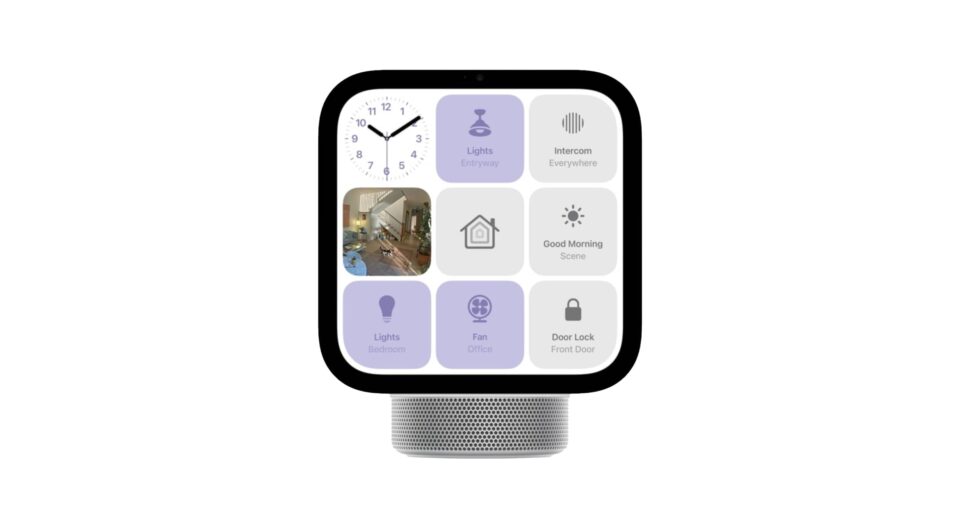
Imagine controlling your home, checking the weather, playing your favourite music, and joining a video call without picking up your phone. That is what a smart display can offer. It brings everyday tasks together in one convenient place and makes your home a little smarter.
When comparing Apple HomeView vs Google Nest Hub, the biggest question is simple: which device fits your lifestyle better?
Both products are designed to make daily life easier, but they appeal to different users. Apple focuses on its connected ecosystem, while Google offers a familiar experience for people who already use its services. Let’s compare their features, entertainment options, and smart home capabilities to help you decide.
1. Design and Display: Simple or Premium?
A smart display should look good wherever you place it, whether that’s your kitchen counter, bedside table, or living room shelf.
Apple HomeView is designed with a premium look and a display intended to complement other Apple devices. Its camera and smart home features also make it useful for everyday communication and home control.
Google Nest Hub (2nd Gen) takes a simpler approach. Its compact screen and fabric-covered base fit comfortably into most rooms without taking up much space.
If design and a premium Apple experience matter to you, HomeView may be more appealing. If you prefer something practical and straightforward, Nest Hub is worth considering.
2. Smart Home Control: Apple vs Google
One of the main reasons to buy a smart display is to control your home with less effort.
With Apple HomeView, users can manage compatible smart home accessories and access supported Apple services. It is particularly attractive to people who already use an iPhone or other Apple devices.
Google Nest Hub works with compatible smart home products and Google services. You can use voice commands to check information, set timers, manage routines, and control supported devices.
The important thing to remember is that not every smart home product works with every platform. Before buying, check whether your existing lights, cameras, plugs, and other accessories are compatible.
The better choice: Apple HomeView for people invested in Apple’s ecosystem, or Google Nest Hub for users who prefer Google’s connected services.
3. Entertainment: Music, Videos, and More
A smart display isn’t just for controlling lights. It can also make your daily routine more enjoyable.
Google Nest Hub supports compatible entertainment services, including YouTube, YouTube Music, and Spotify. You can listen to music while cooking, follow videos, or enjoy your favourite content around the house.
Apple HomeView is designed to work with Apple’s services, including Apple Music, alongside supported apps and features. However, you should check which streaming apps are available before making a purchase.
If you regularly watch YouTube or use Google’s services, Nest Hub could be a natural fit. If your music, devices, and subscriptions are already part of Apple’s ecosystem, HomeView may feel more convenient.
4. Video Calls and Everyday Convenience
Video calling can be especially useful when you want to speak with family or friends while keeping your hands free.
Apple HomeView features a front-facing camera and supports FaceTime, making it an option for households that regularly communicate through Apple devices.
Google Nest Hub (2nd Gen) does not have a camera. Instead, it offers features such as gesture controls and Sleep Sensing, which can provide sleep-related insights when enabled and supported.
Your choice Apple HomeView vs Google Nest Hub depends on what matters most: video communication and Apple’s connected features, or hands-free convenience and sleep tracking.
5. Price and Value for Money
Price can make a big difference when choosing a smart home display.
Apple HomeView sits in the premium category, so it makes the most sense for people who will use its connected features regularly. Paying more is not necessarily worthwhile if you only need a screen for basic tasks.
Google Nest Hub (2nd Gen) launched at a lower price, although current prices and availability vary by retailer and market.
Before buying either device, compare the latest prices, supported features, and compatibility with your existing Apple HomeView vs Google Nest Hub devices. A lower-priced product that meets your needs may offer better value than a more expensive device with features you rarely use.
Apple HomeView vs Google Nest Hub: Final Verdict
So, which smart display should you choose?
Choose Apple HomeView if you use Apple devices, make FaceTime calls, and want a smart home display that fits into your existing Apple setup.
Choose Google Nest Hub (2nd Gen) if you prefer Google services, enjoy compatible streaming content, and want useful smart home features in a compact display.
Ultimately, the best smart display is the one that makes your daily routine easier. Think about the devices you already own, the features you will actually use, and how much you want to spend.
A smart home doesn’t need to be complicated or expensive. Start with the features that matter most to you, and choose the Apple HomeView vs Google Nest Hub device that fits your home and lifestyle.
