
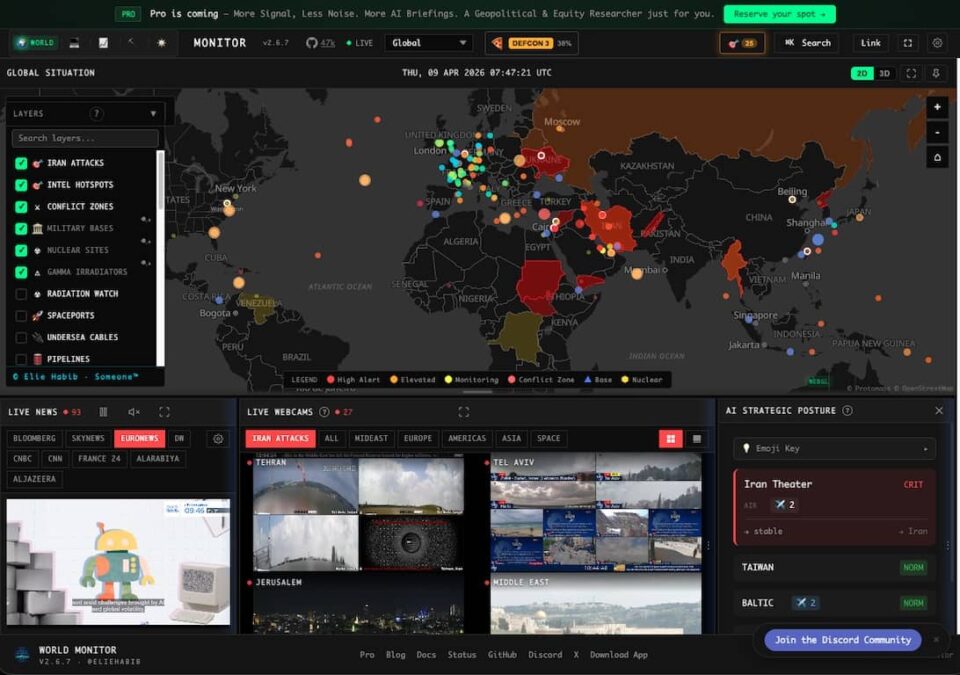
How a side project (World Monitor) by the CEO of Anghami became one of the fastest-growing intelligence tools on GitHub — and why it matters for everyone from analysts to curious citizens. There was a time when real-time global intelligence was the exclusive domain of government agencies and hedge funds running six-figure terminal subscriptions. Ordinary people got the news hours or days later, filtered through editorial lenses, stripped of context, and completely disconnected from the financial, military, and infrastructure signals that actually explain why things happen. That dynamic has been changing steadily thanks to the open-source intelligence (OSINT) movement. But no single project has captured the ambition of bringing all of it together quite like World Monitor. In this review, we will walk through everything you need to know about World Monitor — what it does, how it works, who it is for, and whether it lives up to the hype that has earned it over 45,000 GitHub stars in a remarkably short time.
What Is World Monitor?
World Monitor is a free, open-source, real-time global intelligence dashboard. It pulls together data from over 30 external providers — spanning live news feeds, financial markets, military aircraft tracking, maritime traffic, cyber threat indicators, earthquake monitoring, infrastructure status, and geopolitical event classification — and displays it all on interactive 3D and 2D maps with AI-assisted analysis. Think of it as a control room for the planet. Instead of toggling between a news site, a stock ticker, a flight tracker, and a threat map, World Monitor merges all of these into a single interface where you can see how events correlate with each other in real time. The One-Line Summary: World Monitor aggregates 435+ curated news feeds across 45 data layers into an AI-powered intelligence dashboard that anyone can use — for free, with no login required.
The Backstory: Who Built It and Why
World Monitor was created by Elie Habib, the CEO of Anghami (the Middle East’s largest music streaming platform). What started as a personal side project — born out of frustration with fragmented news sources during a period of intense geopolitical upheaval — evolved into one of the most ambitious open-source OSINT tools on the internet. The project is licensed under AGPL-3.0 for non-commercial use, with a separate commercial license available for businesses. It has attracted a vibrant community of contributors, with nearly 3,000 commits to date and an active Discord server where developers and OSINT enthusiasts collaborate on new features and data layers.
World Monitor by the Numbers
- 45,800+ GitHub Stars
- 435+ Curated News Feeds
- 45 Interactive Data Layers
- 92 Stock Exchanges Tracked
- 21 Languages Supported
- 30+ External Data Providers
- 7,300+ GitHub Forks
- 5 Dashboard Variants
Core Features: What Makes It Special
1. Massive Multi-Source News Aggregation
World Monitor pulls from 435+ curated feeds spanning 15 categories, powered by integration with the GDELT Project — a global database that monitors broadcast, print, and web news in over 100 languages. The feeds are categorized by threat level, geographic region, and topic, so you can zoom into exactly the signal you care about while filtering out the noise.
2. Interactive Dual-Engine Mapping
The mapping system is where World Monitor truly flexes. It runs two rendering engines simultaneously: a 3D globe powered by globe.gl and Three.js for the dramatic orbital view, and a 2D flat map built on deck.gl and MapLibre GL for detailed tactical analysis. You can toggle between 45 data layers including:
- Infrastructure: Submarine cables, internet outages, power grid status
- Military: Real-time flight paths via ADS-B data (Wingbits partnership)
- Maritime: Live vessel tracking across global shipping lanes
- Conflict: Active conflict zones and kinetic event monitoring
- Natural disasters: Wildfire detection via satellite, earthquake monitoring
3. Country Instability Index (CII)
One of World Monitor’s most original features is the Country Instability Index — a real-time 0-to-100 score computed for every monitored nation. The CII factors in baseline risk data, active unrest indicators, security events, and information velocity (how fast news about a country is accelerating). This gives you an at-a-glance reading of which regions are heating up before the headlines catch on.
4. GDELT Bilateral Tension Tracking
World Monitor tracks six strategic country pairs — USA-Russia, Russia-Ukraine, USA-China, China-Taiwan, USA-Iran, and USA-Venezuela — using GDELT’s Goldstein Political Relations scores. This shows you real-time tension levels and trend directions between the world’s most consequential geopolitical relationships, something that was previously only available through expensive institutional platforms.
5. Financial Market Radar
The Finance Radar tracks 92 stock exchanges alongside commodities and cryptocurrency in real time. The real value here is not just the numbers — it is the ability to see financial movements side by side with the geopolitical events driving them. When an incident occurs in the Strait of Hormuz, you can watch oil futures react in the same interface.
6. Cyber Threat Monitoring
World Monitor integrates live cyber threat intelligence feeds, including data from Telegram OSINT channels and dedicated cybersecurity sources. It monitors internet outages, DDoS attacks, and vulnerability disclosures alongside the geopolitical context that often explains them.
Five Dashboards, One Codebase
Rather than trying to cram every data layer into one overwhelming view, World Monitor ships five specialized dashboard variants:
- Primary (worldmonitor.app) — Full global intelligence with all layers and all data
- Tech (tech.worldmonitor.app) — Technology news, cyber threats, internet infrastructure
- Finance (finance.worldmonitor.app) — Markets, exchanges, commodities, crypto
- Commodity (commodity.worldmonitor.app) — Energy, metals, agricultural commodities
- Happy (happy.worldmonitor.app) — Positive news only, a refreshing change of pace
The “Happy” variant deserves a special mention. In a tool designed to track crises and conflicts, the decision to include a variant that surfaces only positive global news is a thoughtful touch that speaks to the project’s broader philosophy: intelligence should inform, not overwhelm.
AI-Powered Intelligence Without the Cloud
World Monitor does not just aggregate raw data — it processes it using AI to generate summarized briefs and threat classifications. What sets it apart from many tools in this space is its commitment to privacy through local AI support. Three AI Integration Options:
- Ollama (Local): Run open-source language models entirely on your own hardware. No data leaves your machine. This is the option favored by privacy-conscious users and security researchers.
- Groq: Cloud-based inference using Groq’s ultra-fast LPU hardware for users who want speed and do not mind cloud processing.
- OpenRouter: Access to a marketplace of models including GPT-4, Claude, and Mistral variants for maximum flexibility.
Additionally, World Monitor uses Transformers.js for browser-side AI processing, which means basic classification and summarization can run directly in your browser tab without any external calls. The AI pipeline uses a hybrid keyword/LLM approach for threat classification. It runs multi-signal anomaly detection to flag unusual patterns, applies temporal baseline learning (so it knows what “normal” looks like for a given region and can detect deviations), performs geographic convergence detection (when multiple data signals point to the same area simultaneously), and incorporates source credibility scoring to weight the reliability of different intelligence sources.
Under the Hood: The Technical Architecture
For developers and technical users, here is what powers World Monitor behind the scenes:
- Frontend: Vanilla TypeScript + Vite bundler
- 3D Globe: globe.gl + Three.js
- 2D Map: deck.gl + MapLibre GL
- Desktop App: Tauri 2 (Rust-based) + Node.js sidecar
- API Layer: Vercel Edge Functions (60+ implementations)
- Data Contracts: Protocol Buffers (92 definitions, 22 services)
- Caching: 3-tier system — Redis (Upstash) + CDN + Service Worker
- Languages: TypeScript (62%), JavaScript (32%), Rust, CSS
The choice of Tauri over Electron for the desktop application is significant. Tauri uses the system’s native web renderer instead of bundling an entire Chromium instance, resulting in dramatically smaller application sizes and lower memory consumption. The Node.js sidecar enables complete offline operation, including local map tile serving — meaning you can use World Monitor on an air-gapped network if needed. For developers who want to build on top of World Monitor, the project exposes a typed API with 22 services, 92 protocol buffer files, 60+ edge functions, and auto-generated TypeScript clients.
Who Is This Tool For?
OSINT Researchers and Journalists: If your work involves tracking global events, verifying claims, or monitoring emerging situations, World Monitor provides a unified workspace that replaces dozens of individual tools and browser tabs. Financial Analysts and Traders: The ability to see market data alongside the geopolitical events that drive it — in real time, on the same screen — is valuable for anyone making investment decisions sensitive to global risk. Security Professionals: Corporate security teams, risk consultants, and travel safety managers can use the Country Instability Index and conflict monitoring layers to assess and communicate risk levels. Developers and Data Engineers: The open-source codebase, documented API, and Protocol Buffer contracts make it a strong foundation for building custom intelligence tooling. Curious Citizens: You do not need to be a professional analyst to benefit from World Monitor. Anyone who wants to understand what is actually happening in the world will find it valuable.
How to Get Started
Getting started with World Monitor takes about 30 seconds. Option 1 — Browser (No Installation): Visit worldmonitor.app in any modern browser. No signup, no login, no paywall. Option 2 — Desktop Application: Download the native app for macOS, Windows, or Linux from the official site or SourceForge. Option 3 — Self-Hosted: Clone the GitHub repository, run npm install && npm run dev, and you have a local instance running. Option 4 — Mobile: World Monitor is available as a PWA (Progressive Web App) with offline support, and there is also a native iOS app on the App Store.
Limitations and Things to Keep in Mind
No tool is perfect, and transparency about limitations is important for a fair review. Information overload is real. With 45 data layers available, new users can easily feel overwhelmed. The specialized variants help, but there is still a learning curve. Data quality depends on sources. World Monitor aggregates from open sources — ADS-B transponders, public news feeds, satellite data, and community-contributed OSINT channels. The data is only as reliable as those sources. The source credibility scoring helps, but critical analysis should always accompany the data. AGPL licensing matters for businesses. While completely free for personal use, businesses that want to integrate World Monitor into their own products need to either comply with AGPL or purchase a commercial license. Resource consumption. Running the full dashboard with multiple layers active can be demanding on older hardware. The desktop application is more performant than the browser version for sustained use.
The Verdict: 9 out of 10
World Monitor is, quite simply, the most ambitious open-source intelligence dashboard available today. It combines the kind of data aggregation that used to cost thousands of dollars per month with thoughtful UI design, local AI support for privacy, and a developer-friendly architecture that invites community contribution. Its only real weakness is the complexity inherent in its ambition — there is a lot here, and it takes time to learn how to use it effectively. But that is a problem of abundance, not deficiency. For anyone who wants to understand the world as it actually operates — not through the narrow window of a single news outlet or social media feed, but through the full spectrum of signals that shape events — World Monitor is the tool to try. And at a price point of zero, there is no barrier to getting started. Try World Monitor | View on GitHub
Frequently Asked Questions
What is World Monitor? World Monitor is a free, open-source real-time global intelligence dashboard that aggregates over 435 news feeds and 45 data layers — including geopolitical events, financial markets, military flight tracking, cyber threats, and infrastructure monitoring — into a single interactive interface with AI-powered analysis. Is World Monitor free to use? Yes, World Monitor is completely free for personal and non-commercial use with no signup or login required. The project is open-source under the AGPL-3.0 license. A separate commercial license is available for business applications. Who created World Monitor? World Monitor was created by Elie Habib, the CEO of Anghami. What began as a side project has grown into one of the fastest-growing OSINT projects on GitHub with over 45,000 stars. Can World Monitor run offline? Yes. The Tauri-based desktop application includes a local Node.js sidecar for complete offline operation. It also supports local AI models via Ollama, so you can run AI-powered analysis entirely on your own hardware. What data sources does World Monitor use? World Monitor aggregates from 30+ external data providers including the GDELT Project, ADS-B flight tracking (via Wingbits), ACLED conflict data, maritime transponders, satellite fire detection systems, Telegram OSINT channels, live RSS news feeds, financial market APIs, and cybersecurity intelligence sources. Is World Monitor safe for privacy-conscious users? Yes. World Monitor supports local AI inference via Ollama (no data sent to cloud), can run fully self-hosted, and the desktop application supports air-gapped operation. No account or personal data is required to use the browser version.
